
FLIR Thermal Studio Pro Software 12 Month Licence


- 12 month or perpetual licence for FLIR Pro Software featuring advanced IR image editing
- Create pre-planned guided inspections with optional FLIR Route Creator plugin
- View, stream and record radiometric video - including dual streaming
Use reward points to get money off future purchases.
Please note: Customers must be signed into their account to be elegible. Find out more about reward points here.
Found this product cheaper & in stock somewhere else? Give us the details and we'll endeavour to match the price.
To price match, contact us online or call 0113 248 9966.
We offer FREE standard delivery on all orders over £249, with a range of next-day options also available on many items.
Find out more on our delivery information page.
We want our customers to be fully satisfied with the goods they purchase from us, offering returns for up to 60 days.
Find out more about our refunds policy here.
We're always happy to offer help, information & advice to find the right instrument for you, so please get in touch.
To speak to our sales team, call us on 0113 248 9966, use our Live Chat service or contact us online.
Use reward points to get money off future purchases.
Please note: Customers must be signed into their account to be elegible. Find out more about reward points here.
Found this product cheaper & in stock somewhere else? Give us the details and we'll endeavour to match the price.
To price match, contact us online or call 0113 248 9966.
We offer FREE standard delivery on all orders over £249, with a range of next-day options also available on many items.
Find out more on our delivery information page.
We want our customers to be fully satisfied with the goods they purchase from us, offering returns for up to 60 days.
Find out more about our refunds policy here.
We're always happy to offer help, information & advice to find the right instrument for you, so please get in touch.
To speak to our sales team, call us on 0113 248 9966, use our Live Chat service or contact us online.
FLIR Thermal Studio Suite Software Pro Licence
The FLIR Thermal Studio Suite Software Pro Licence is rapid, efficient software designed for advanced thermal analysis and creating extremely detailed reports. The wealth of tools provided by the FLIR Pro subscription is ideal for evaluating, editing, organising and reporting images in a swift yet still highly accurate manner. Featuring the advanced processing capability crucial for predictive maintenance, with the batch processing function of the software save time and prepare thousands of thermal and visual images all at once. Suitable for surveying critical components and system troubleshooting, along with increasing productivity the Thermal Studio Suite is fully compatible with files from handheld thermal cameras, optical gas imaging (OGI) cameras & unmanned aircraft systems (UAS).
A state of the art system, the FLIR Software with Pro Licence utilises powerful reporting solutions for streamlining inspections and highlighting critical repairs. Manage thousand of thermal images or videos and create tailor-made professional quality reports using the included predefined or unlimited custom templates. With formulas, overlays and the option for a custom logo in the image build a report with upwards of 100 images attached, the flexible document format includes an intuitive drag & drop function. Even with thermal cameras like the FLIR Exx-Series which posses advanced on-camera image enhancement tools such as the exclusive MSX technology feature, often a thermographer will be required to adjust an image post-capture.
Enhance critical details with the FLIR Thermal Studio Suite, fine tuning images to help identify problems before conveying observations & recommendations to untrained customers. Use the selectable custom colour palettes, High Sensitivity Mode (HSM) and pixel binning options to facilitate the identification of difficult-to-see gas leaks within an IR image. Boasting tools for zoom/pan, level & span, emissivity adjustment, temperature scale auto-adjustments, annotations and more this editing suite is the ideal post-inspection software. Alongside controls such as MSX alignment, free rotation, resize and crop, the Pro version includes Magic wand & Polygon features.
Accelerate post-processing tasks using the advanced features of the FLIR Thermal Studio Suite Software Pro Licence. A vast array of parameters can be applied to images for boundaries, emissivity, reference temperature, distance, relative humidity, insulation and much more. View, stream and record radiometric video including dual steaming before exporting files in PDF, XPS, JPG, ATR, CSV, AVI, Map and Graphy without the need for additional software. The software is compatible with all FLIR products which produce images in a radiometric JPEG format, with findings made abundantly clear thanks to the recording, analysing, segmenting and editing done within the system.
FLIR Route Creator
Combine the FLIR Thermal Studio Suite Pro with the optional FLIR Route Creator plugin to create a system capable of reducing reporting time by up to 50%. For significantly more efficient surveys, pre-build an inspection path through every location in need of surveying within the software before either printing or downloading the route straight to a FLIR thermal camera with Inspection Route enabled, such as the Exx-Series. The Inspection Route feature will then direct a user though the pre-planned operation, acquiring temperature data and thermal images in a logical sequence. Not only does this help in automating data management, but it allows the operator to easily maintain historical records for improved predictive maintenance.
Reduce the risk of missing assets and avoid unexpected faults and breakdowns with the Thermal Studio Suite and Route Creator. Create lists of the assets in need of inspection at each location, in the most organised manner, to reliability monitor large systems over an extended period of time. Once guided step-by-step through each location, auto-matching images, notes and comments to the correct asset on your inspection list as you go, follow up by uploading all of this data directly into your report templates.
Key Features
- Full access to FLIR Thermal Studio Software
- 1 year licence for Pro edition
- Built for advanced thermal imagery analysis
- Huge suite of editing tools for enhancing imagery
- Designed for use with optional FLIR Route Creator plugin
- Compatible with Inspection Route enabled FLIR Thermal Cameras
- View, stream & record radiometric video including dual streaming
- Produce professional quality reports
- Ideal for Batch Processing with all image and measurement controls
- Crucial for surveying, troubleshooting and increasing productivity
- For use with all cameras which produce radiometric JPEG format images
- Compatible with handheld thermal cameras, OGI cameras & UAS
- Custom paramaters
- Parameters for: Emissivity, reflected temperature, distance, external optics temperature & much more
- Humidity and Insulation alarms included
- Unlimited custom reports templates with editing
- Create reports capable with more than 100 images
- MSX alignment feature
- Emissivity adjustment
- Select a custom colour palette
- High Sensitivity Mode & Pixel Binning features
- Zoom/Pan, level & span, temperature scale auto-adjustments and annotation options
- MSX alignment, free rotation, resize and crop tools
- Formulas included
- Overlays available
- Available in more than 20 languages
- Export PDF, XPS, JPG, ATR, CSV, AVI, Map and Graphy without additional software
FLIR part number: SSPRO
FLIR Software Comparison
The FLIR Thermal Studio Suite Software is available in three versions; Starter, Standard and Pro
| Software | Thermal Studio Starter | Thermal Studio Standard | Thermal Studio Pro | |
|---|---|---|---|---|
| File Formats | ||||
| Image files | JPEGs, radiometric JPEGs | |||
| Video files | MP4, CSQ, SEQ | |||
| Export formats | PDF, XPS, JPG, ATR | PDF, XPS, JPG, ATR, CSV | PDF, XPS, JPG, ATR, CSV, AVI | |
| Radiometric Analysis | ||||
| View and edit radiometric images | Yes | |||
| Spot, Box, Line, Ellipse/Circle | Yes | |||
| Delta | - | Yes | ||
| Formulas | - | Yes | ||
| Measurment Alarms | - | Humidity, Insulation | ||
| Magic wand, Polygon | - | - | Yes | |
| Reporting | ||||
| Quick reporting with pre-defined templates | Yes | |||
| Custom report templates | - | Up to five custom templates | Unlimited custom templates | |
| Custom reporting with editor | - | Yes | ||
| Custom logo in image | - | - | Yes | |
| Manage routes with FLIR Route Creator Plugin* | - | - | Yes | |
| Presentation features | ||||
| Image presentation modes | MSX®, thermal only, thermal fusion, blending, picture-in-picture, visual only | |||
| Image controls | MSX alignment, 90° rotation | MSX alignment, 90° rotation, resize, crop | MSX alignment, free rotation, resize, crop | |
| Image annotations | Text, Voice | |||
| Colour distribution | Histogram equalization, signal linear, temperature linear | Histogram equalisation, signal linear, temperature linear, Digital Detail Enhancement | ||
| Image overlay | - | Yes | ||
| Custom colour palettes | - | - | Yes | |
| Gas visualisation | - | - | High sensitivity mode (HSM) and pixel binning | |
| Streaming and recording | ||||
| View non-radiometric video | Yes | |||
| Record non-radiometric video | Yes | |||
| View radiometric video | Yes | |||
| Edit radiometric video (SEQ and CSQ) | - | Yes | ||
| Record radiometric video | - | - | Yes | |
| Segment video capabilities | - | - | Yes | |
| Dual streaming (visual & IR) | - | - | Yes | |
| Multi-image editing/batch processing | ||||
| Scale & units | - | Yes | ||
| Image presentation | - | Palette, fusion, UltraMax® | Palette, fusion, fusion alignment, UltraMax, isotherm, alarm, clear isotherms, zoom factor, notes, color distribution, sketch, rotate | |
| Measurements | - | Spots, clear all | Spots, Ellipses, Rectangles, Lines, Delta, clear all | |
| Parameters | - | Emissivity, distance | Emissivity, reflected temperature, reference temperature, distance, atmospheric temperature, external optics temperature, external optics transmission, relative humidity | |
| Output | - | Radiometric JPG | Radiometric JPG, JPG, CSV, AVI, Map, Graphy | |
| Plugin support | ||||
| FLIR Route Creator (*sold separately) | - | - | Yes | |
| Camera support | ||||
| Compatible FLIR products | All cameras that generate images in radiometric JPEG format (including A-, B-, C-, K-, T-, E-, GF-, i-, P6- and FLIR One series) | |||
| Compatible cameras with embedded | FLIR E54, E76, E86, E96, and any T-Series camera purchased after October 8, 2020 | |||
FLIR Thermal Studio Suite Software Pro Licence
Through March 31 2021, customers who purchase an Exx-Series camera will receive a free three-month Thermal Studio Pro and Route Creator trial bundle.
The FLIR Thermal Studio Suite Software Pro Licence is rapid, efficient software designed for advanced thermal analysis and creating extremely detailed reports. The wealth of tools provided by the FLIR Pro subscription is ideal for evaluating, editing, organising and reporting images in a swift yet still highly accurate manner. Featuring the advanced processing capability crucial for predictive maintenance, with the batch processing function of the software save time and prepare thousands of thermal and visual images all at once. Suitable for surveying critical components and system troubleshooting, along with increasing productivity the Thermal Studio Suite is fully compatible with files from handheld thermal cameras, optical gas imaging (OGI) cameras & unmanned aircraft systems (UAS).
A state of the art system, the FLIR Software with Pro Licence utilises powerful reporting solutions for streamlining inspections and highlighting critical repairs. Manage thousand of thermal images or videos and create tailor-made professional quality reports using the included predefined or unlimited custom templates. With formulas, overlays and the option for a custom logo in the image build a report with upwards of 100 images attached, the flexible document format includes an intuitive drag & drop function. Even with thermal cameras like the FLIR Exx-Series which posses advanced on-camera image enhancement tools such as the exclusive MSX technology feature, often a thermographer will be required to adjust an image post-capture.
Enhance critical details with the FLIR Thermal Studio Suite, fine tuning images to help identify problems before conveying observations & recommendations to untrained customers. Use the selectable custom colour palettes, High Sensitivity Mode (HSM) and pixel binning options to facilitate the identification of difficult-to-see gas leaks within an IR image. Boasting tools for zoom/pan, level & span, emissivity adjustment, temperature scale auto-adjustments, annotations and more this editing suite is the ideal post-inspection software. Alongside controls such as MSX alignment, free rotation, resize and crop, the Pro version includes Magic wand & Polygon features.
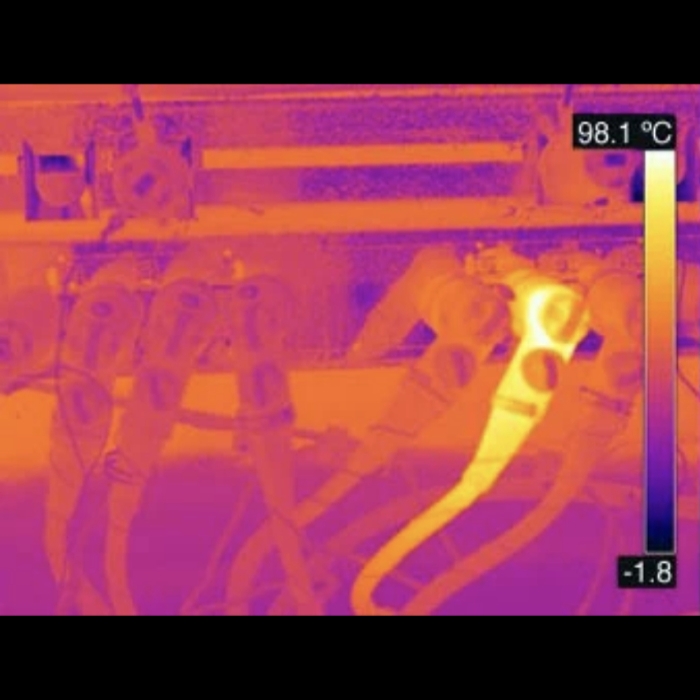
Before adjusting Level and Span
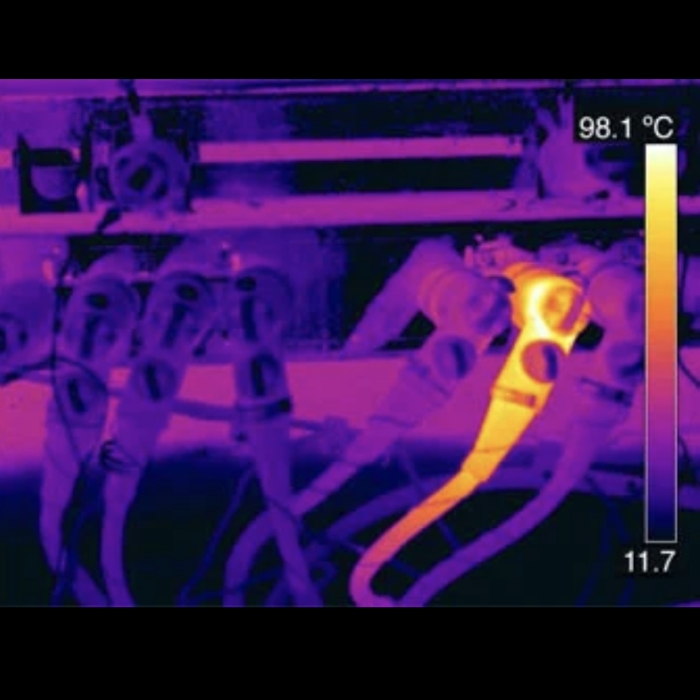
After adjusting Level and Span
Accelerate post-processing tasks using the advanced features of the FLIR Thermal Studio Suite Software Pro Licence. A vast array of parameters can be applied to images for boundaries, emissivity, reference temperature, distance, relative humidity, insulation and much more. View, stream and record radiometric video including dual steaming before exporting files in PDF, XPS, JPG, ATR, CSV, AVI, Map and Graphy without the need for additional software. The software is compatible with all FLIR products which produce images in a radiometric JPEG format, with findings made abundantly clear thanks to the recording, analysing, segmenting and editing done within the system.
FLIR Route Creator
Combine the FLIR Thermal Studio Suite Pro with the optional FLIR Route Creator plugin to create a system capable of reducing reporting time by up to 50%. For significantly more efficient surveys, pre-build an inspection path through every location in need of surveying within the software before either printing or downloading the route straight to a FLIR thermal camera with Inspection Route enabled, such as the Exx-Series. The Inspection Route feature will then direct a user though the pre-planned operation, acquiring temperature data and thermal images in a logical sequence. Not only does this help in automating data management, but it allows the operator to easily maintain historical records for improved predictive maintenance.
Reduce the risk of missing assets and avoid unexpected faults and breakdowns with the Thermal Studio Suite and Route Creator. Create lists of the assets in need of inspection at each location, in the most organised manner, to reliability monitor large systems over an extended period of time. Once guided step-by-step through each location, auto-matching images, notes and comments to the correct asset on your inspection list as you go, follow up by uploading all of this data directly into your report templates.
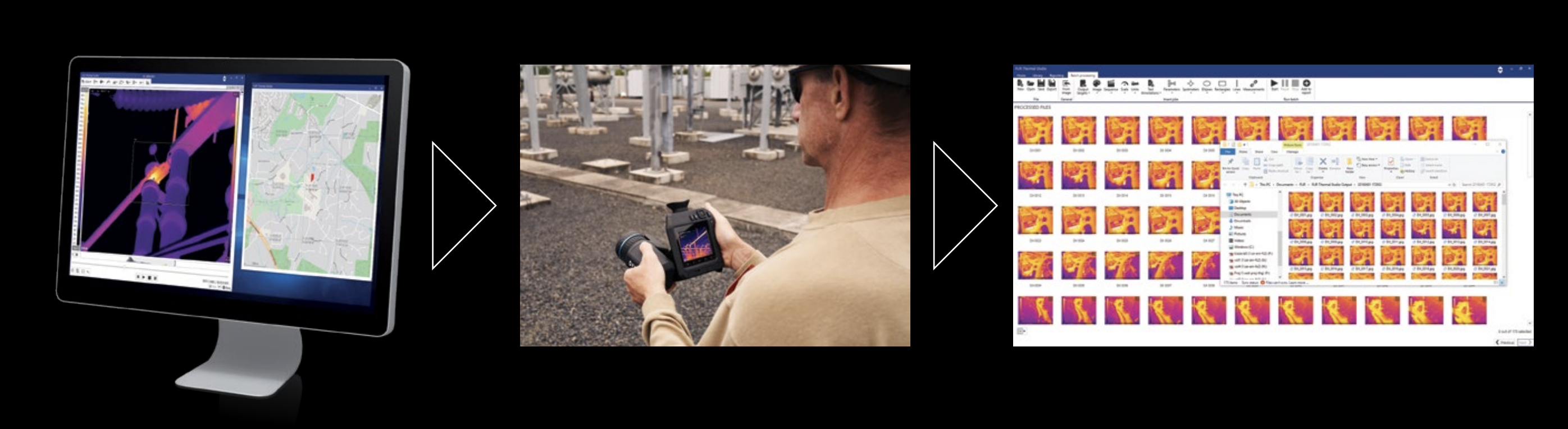
*Exx-Series and T-Series cameras purchased prior to October 8, 2020 will require the addition of FLIR Inspection Route.
Key Features
- Full access to FLIR Thermal Studio Software
- 1 year licence for Pro edition
- Built for advanced thermal imagery analysis
- Huge suite of editing tools for enhancing imagery
- Designed for use with optional FLIR Route Creator plugin
- Compatible with Inspection Route enabled FLIR Thermal Cameras
- View, stream & record radiometric video including dual streaming
- Produce professional quality reports
- Ideal for Batch Processing with all image and measurement controls
- Crucial for surveying, troubleshooting and increasing productivity
- For use with all cameras which produce radiometric JPEG format images
- Compatible with handheld thermal cameras, OGI cameras & UAS
- Custom paramaters
- Parameters for: Emissivity, reflected temperature, distance, external optics temperature & much more
- Humidity and Insulation alarms included
- Unlimited custom reports templates with editing
- Create reports capable with more than 100 images
- MSX alignment feature
- Emissivity adjustment
- Select a custom colour palette
- High Sensitivity Mode & Pixel Binning features
- Zoom/Pan, level & span, temperature scale auto-adjustments and annotation options
- MSX alignment, free rotation, resize and crop tools
- Formulas included
- Overlays available
- Available in more than 20 languages
- Export PDF, XPS, JPG, ATR, CSV, AVI, Map and Graphy without additional software
FLIR part number: SSPRO
FLIR Software Comparison
The FLIR Thermal Studio Suite Software is available in two versions, Standard and Pro.
| Software | Thermal Studio Standard | Thermal Studio Pro | |
|---|---|---|---|
| File Formats | |||
| Image files | JPEGs, radiometric JPEGs | ||
| Video files | MP4, CSQ, SEQ | ||
| Export formats | PDF, XPS, JPG, ATR, CSV | PDF, XPS, JPG, ATR, CSV, AVI | |
| Radiometric Analysis | |||
| View and edit radiometric images | Yes | ||
| Spot, Box, Line, Ellipse/Circle | Yes | ||
| Delta | Yes | ||
| Formulas | Yes | ||
| Measurment Alarms | Humidity, Insulation | ||
| Magic wand, Polygon | No | Yes | |
| Reporting | |||
| Quick reporting with pre-defined templates | Yes | ||
| Custom report templates | Up to five custom templates | Unlimited custom templates | |
| Custom reporting with editor | Yes | ||
| Custom logo in image | No | Yes | |
| Manage routes with FLIR Route Creator Plugin* | No | Yes | |
| Presentation features | |||
| Image presentation modes | MSX®, thermal only, thermal fusion, blending, picture-in-picture, visual only | ||
| Image controls | MSX alignment, 90° rotation, resize, crop | MSX alignment, free rotation, resize, crop | |
| Image annotations | Text, Voice | ||
| Colour distribution | Histogram equalisation, signal linear, temperature linear, Digital Detail Enhancement | ||
| Image overlay | Yes | ||
| Custom color palettes | No | Yes | |
| Gas visualisation | No | High sensitivity mode (HSM) and pixel binning | |
| Streaming and recording | |||
| View non-radiometric video | Yes | ||
| Record non-radiometric video | Yes | ||
| View radiometric video | Yes | ||
| Edit radiometric video (SEQ and CSQ) | Yes | ||
| Record radiometric video | No | Yes | |
| Segment video capabilities | No | Yes | |
| Dual streaming (visual & IR) | No | Yes | |
| Multi-image editing/batch processing | |||
| Scale & units | Yes | ||
| Image presentation | Palette, fusion, UltraMax® | Palette, fusion, fusion alignment, UltraMax, isotherm, alarm, clear isotherms, zoom factor, notes, color distribution, sketch, rotate | |
| Measurements | Spots, clear all | Spots, Ellipses, Rectangles, Lines, Delta, clear all | |
| Parameters | Emissivity, distance | Emissivity, reflected temperature, reference temperature, distance, atmospheric temperature, external optics temperature, external optics transmission, relative humidity | |
| Output | Radiometric JPG | Radiometric JPG, JPG, CSV, AVI, Map, Graphy | |
| Plugin support | |||
| FLIR Route Creator (*sold separately) | No | Yes | |
| Camera support | |||
| Compatible FLIR products | All cameras that generate images in radiometric JPEG format (including A-, B-, C-, K-, T-, E-, GF-, i-, P6- and FLIR One series) | ||
| Compatible cameras with embedded | FLIR E54, E76, E86, E96, and any T-Series camera purchased after October 8, 2020 | ||
Overview
Connections & Communications
Imaging & Optical
Included Software
Measurement & Analysis
Other
Storage Media
|
| Includes 12 month licence and FLIR Route Creator Plug-In Module |